Thursday, November 10, 2022

Accept Long File Paths on Windows 10


Make Windows 10 Pro Or Enterprise Accept Long File Paths

To allow Windows 10 Pro or Enterprise to use long file paths, we’re going to use the Group Policy Editor. It’s a tool that allows us to set policies on how Windows operates at the computer and the user levels.

Once the Group Policy Editor opens, navigate to Computer Configuration > Administrative Templates > System > Filesystem. There you’ll see the policy Enable Win32 long paths.
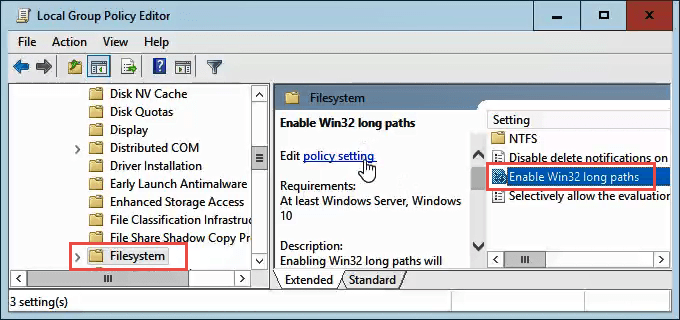
Double-click on it to edit the policy setting. Change it from Disabled to Enabled, then click the OK button to commit the change. 
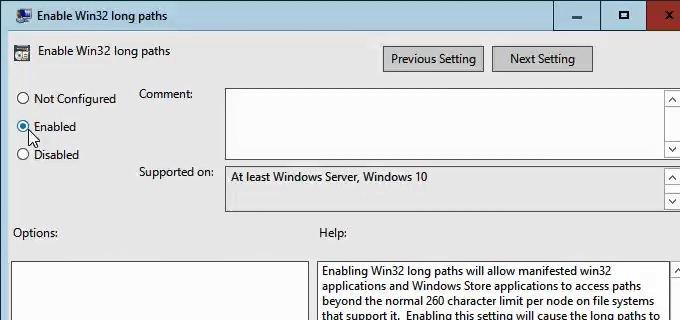
The policy may not take effect right away. You can force the group policy to update, though.

Saturday, December 4, 2021

This file cannot be previewed because there is no previewer installed for it


Fix 1 – Check Attachment Handling Settings

  1. In Outlook, go to “File” > “Options” > “Trust Center” > “Trust Center Settings…” > “Attachment Handling“.
  2. Ensure that “Turn off Attachment Preview” is NOT checked.
  3. Select the “Attachment and Document Previewers…” button.
  4. Make sure that the previewer you wish to use is checked, then select “OK” three times.    

Fix 2 – Registry Fix

  1. Select the “Start” button, then type “regedit“.
  2. Select and open the Registry Editor.
  3. Navigate to the following location:
    Computer\HKEY_LOCAL_MACHINE\SOFTWARE\Microsoft\Windows\CurrentVersion\PreviewHandlers
  4. Creat New > String Value.”

  5. Insert the “Value Data” to the following, then select “OK
  6. {21E17C2F-AD3A-4b89-841F-09CFE02D16B7}                      Microsoft Visio previewer
    {65235197-874B-4A07-BDC5-E65EA825B718}                      Microsoft PowerPoint previewer
    {84F66100-FF7C-4fb4-B0C0-02CD7FB668FE}                        Microsoft Word previewer
    {00020827-0000-0000-C000-000000000046}                        Microsoft Excel previewer


Monday, November 29, 2021

pdf icons changed to chrome But open in default pdf


  1. Change Chrome's default PDF settings
    1. Click on the three dots menu button at upper right; then open Chrome's Settings
    2. In the Search Settings box at top, type "PDF". 
    3. Scroll down the page to locate and click on Site Settings.
    4. Scroll down and locate "PDF Documents".  You may have to click on Additional Content Settings on the bottom to make the PDF Documents option appear.
    5. An option titled "Download PDF files instead of automatically opening them in Chrome"  appears.  Click on the slider at the right to turn it on.
  2. For creators/uploaders of PDFs, disable Fast Web View:
    1. Open Acrobat Pro/DC, drop down the Edit menu, then select Preferences.
    2. Choose Internet.
    3. Uncheck the "Allow Fast Web View" option.
    4. Uncheck "Allow speculative downloading..." option.
    5. Click on OK at lower right to save and close Preferences.

Friday, October 8, 2021

Microsoft Outlook Printing Problems in All Outlook Versions

Close the running Outlook application.

Find the "OutlPrnt" file either using the search option or following the path “%appdata%\Microsoft\Outlook”

Double click on it and rename it with some other name like OutlPrnt1.

Now, run the Outlook application again and see if it is printing normally.

Thursday, September 23, 2021

outlook hang up when open any attachments


Disable Outlook add-ins

  • First of all, move to the File>Ins>add-ins.
  • Switch to the Manage section and hit on the Go button.
  • After appearing in the dialogue box, uncheck all Add-ins and click on the OK button.

Tuesday, September 7, 2021

Set up Scan to Computer HP LaserJet Pro MFP M329, M428-M429, M479

 To enable this feature, in the Embedded Web Server, open the Settings tab, click Security, click Administrator Settings, select the Enable checkbox beside Scan from a Computer or Mobile Device, and then click Apply.

When this feature is enabled, anyone with access to the printer can scan whatever is on the scanner glass.

Tuesday, August 31, 2021

disable APIPA


It may be desirable to disable this and to do this perform the following:

  1. Start the registry editor (Regedit.exe)
  2. Move to HKEY_LOCAL_MACHINE\SYSTEM\CurrentControlSet\Services\Tcpip\Parameters\Interfaces
  3. Select the required interface
  4. From the Edit menu select New - DWORD value
  5. Enter a name of IPAutoconfigurationEnabled and press Enter
  6. Double click the new value and set to 0. Click OK
  7. Close the registry editor

If you have multiple adapters and wish to disable for all just create and set HKEY_LOCAL_MACHINE\SYSTEM\CurrentControlSet\Services\Tcpip\Parameters\IPAutoconfigurationEnabled to 0.

Tuesday, August 3, 2021

How do I reset or clear the TCP/IP autoconfiguration address, 169.XXX.XXX.XXX ?


Before running the command, take note of the existing TCP/IP settings for all of the LAN connections. This command will reset them to the default settings.

  1. To open a command prompt, click Start and then type cmd in the "Search programs and files" box.
  2. At the command prompt, type: netsh int ip reset C:\netsh.log.txt Press Enter.
  3. At the command prompt, type: netsh winsock reset Press Enter.
  4. Confirm that you receive the feedback commands indicating that the reset was successful.
  5. Close the command window.
  6. Shut down the computer, and power it back on. (Cold boot the computer, do not restart it.)
  7. In the Windows Control Panel, click Open Network and Sharing Center, and then click Change Adapter settings.
  8. Re-enter the desired TCP/IP settings for the problem LAN connection.
  9. Disable and re-enable the updated LAN connection.
  10. Right-click the LAN connection, and choose Properties > Details to confirm that the desired IP address is saved.

Wednesday, June 23, 2021

user profile path in regedit

 HKEY_LOCAL_MACHINE\​SOFTWARE\Microsoft\Windows NT\CurrentVersion\ProfileList.

Monday, June 14, 2021

Outlook's AutoComplete Cache (Address form address book )

 after transfer microsoft outlook from old pc to new pc address autocomplete not working


Copy these files from old pc's " 'Outlook.srs','Outlook' and "outlook NK2 (Outlook Nickname File)" File" from the location %AppData%\Microsoft\Outlook.

And paste the same location on new pc 

close outlook and run this command 

"outlook.exe /importnk2"


Saturday, April 24, 2021

The file or directory is corrupted and unreadable


Run this command on cmd:-:  “Chkdsk /f H: